
Recovering a LiFePO4 battery after cell overvoltage protection
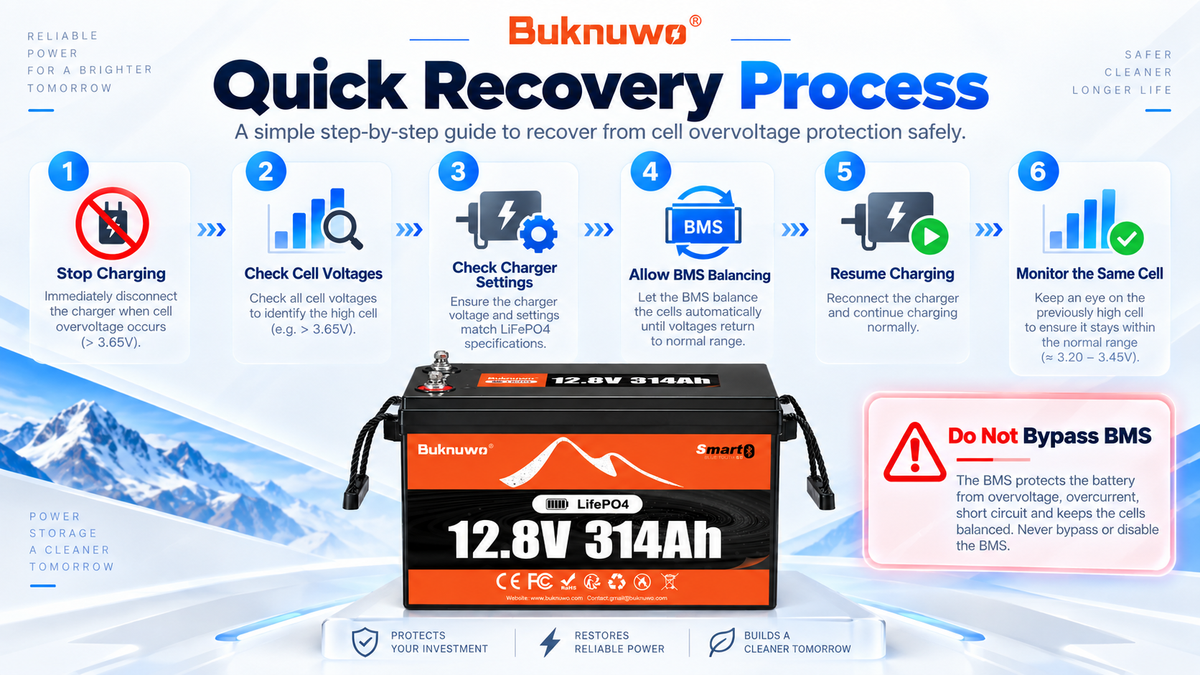
When one cell in a LiFePO4 battery reaches its upper voltage limit before the others, the battery management system (BMS) may stop charging. The battery is not necessarily damaged. An imbalanced state of charge, unsuitable charger settings, or one cell reaching full charge earlier can all lead to the same protection event.
Start by stopping the charge source and recording the cell readings. The aim is to find out why one cell went high, allow the protection condition to clear, and then see whether the same behavior returns.
Stop every charging source
When the app reports cell overvoltage or high cell voltage, stop the AC charger, MPPT solar controller, DC-DC charger, or inverter-charger that is supplying the battery.
The BMS may already have disabled charging. That is the intended protection response when a cell reaches its configured limit. Do not raise the BMS overvoltage threshold to force charging to continue.

Compare the individual cell readings
Total battery voltage does not show how that voltage is divided between the cells. On a Bluetooth battery, record the highest and lowest cell voltages, cell voltage difference (delta V), pack voltage, charge current, and BMS protection status.
This example shows the pattern to look for:
|
Cell |
Example voltage |
|
Cell 1 |
3.45V |
|
Cell 2 |
3.44V |
|
Cell 3 |
3.46V |
|
Cell 4 |
3.65V |
The figures illustrate one cell reading much higher than the others. They are not a universal protection threshold. Actual protection and recovery voltages depend on the battery and BMS model.
Let the high cell voltage settle
After charging stops, the high cell voltage may gradually decrease. Some BMS models restore charging automatically after the cell falls below their recovery threshold.
Wait for the battery to reach its normal recovery condition. Do not change safety limits to speed up the process.

Check whether the charger caused the event
If overvoltage protection returns, review the charging system before trying another cycle. Check charging voltage, absorption voltage, float voltage, LiFePO4 charging mode, and the MPPT settings when solar is used.
Avoid lead-acid equalization or desulfation modes unless the battery manufacturer specifically approves them. The charger should control routine charging, while the BMS remains the final layer of protection.

Give balancing time to work
Cell imbalance is a common reason one cell reaches the limit first. A BMS may reduce the difference through cell balancing, but passive balancing can be slow.
In practice, charging may stop when the high cell reaches its limit, then resume after the voltage falls and the BMS reaches its recovery condition. Several charging and balancing cycles may be needed before the readings move closer together.
Use the correct LiFePO4 charging equipment and allow balancing only under the battery's normal operating conditions.
Watch whether the same cell goes high again
One isolated event does not establish that a cell is defective. Differences in SOC, capacity, internal resistance, temperature, or balancing time can affect which cell rises first near full charge.
The pattern matters. If the same cell repeatedly reaches the high-voltage limit before the others, or the voltage difference keeps growing, the battery needs further diagnosis. Record the cell voltages, charge current, and protection status so the event can be reviewed with the operating conditions.
A practical recovery sequence
1. Stop all charging sources.
2. Record the highest and lowest cell voltages and their difference.
3. Check charger voltage, charging mode, and MPPT settings.
4. Allow the high cell voltage to fall to the BMS recovery condition.
5. Give the BMS time to balance under normal conditions.
6. Resume charging carefully with the correct LiFePO4 equipment.
7. Monitor whether the same cell reaches the limit again.
If protection continues, contact BUKNUWO support for further diagnosis. Do not change the protection threshold simply to keep the battery charging.
